
For over a decade, digital marketers have been fighting a losing war. We have battled against spam filters in email marketing, struggled with banner blindness in display ads, and watched organic reach on social media plummet to near zero. We have been shouting into a crowded room, hoping someone—anyone—would listen.
But in 2026, the noise has stopped. The conversation has moved to a quieter, more intimate space: the digital living room.
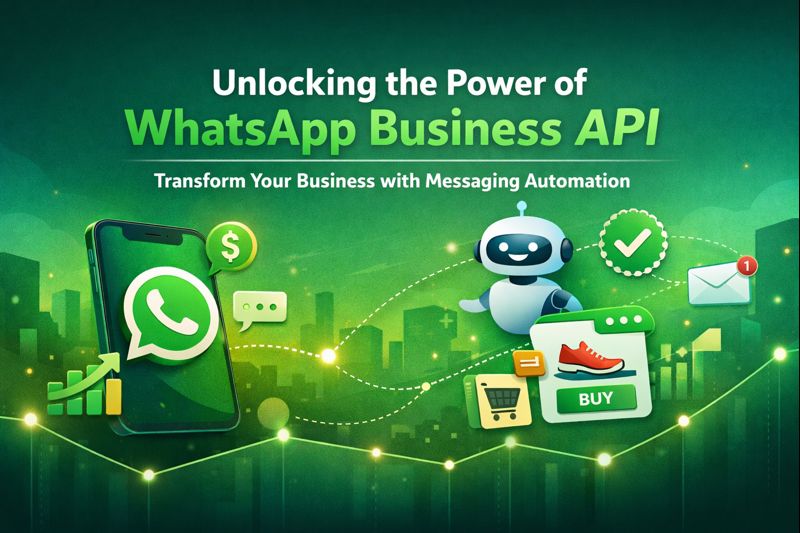
We are, of course, talking about WhatsApp. With open rates consistently hitting 98% and click-through rates that dwarf email by a factor of ten, WhatsApp marketing is no longer an alternative channel. It is the primary channel. However, to truly harness this power at scale, you cannot rely on the simple app you use to text your friends. You need the heavy artillery: the WhatsApp Business API.
The Great Divide: The App vs. The API
Before diving into strategy, we must clear up a common misconception. There are two versions of WhatsApp for business.
WhatsApp Business App: This is the free app designed for small business owners—the local bakery or the freelance consultant. It lives on a single phone and is limited to broadcasting to 256 contacts at a time.
WhatsApp Business API: This is not an app on a phone; it is a cloud-based infrastructure. It connects your software (CRM, website, customer support tools) directly to the WhatsApp network.
The WhatsApp Business API is the only solution that allows for unlimited messaging, multiple users managing one number, and advanced message automation. It is the bridge that turns a messaging app into a revenue-generating machine.
Setting Up the Engine: How to Get Started
Unlike creating an Instagram account, getting access to the API requires verification. Meta (WhatsApp’s parent company) wants to ensure that only legitimate businesses enter this space to prevent it from becoming a spam haven.
1. Choose a Business Solution Provider (BSP)
You cannot download the API. You must access it through a Meta-authorized partner (BSP) like Twilio, WATI, 360dialog, or Interakt. These partners provide the dashboard where you will actually manage your campaigns.
2. Verification and the Green Tick
To access the full power of the API, your Facebook Business Manager must be verified. This involves submitting legal business documents. Once verified, you can apply for the coveted Green Tick—the badge of authenticity that sits next to your name. In 2026, this tick is a massive psychological trigger for trust; users are 40% more likely to engage with a verified business.
3. Template Approval
This is the unique constraint of WhatsApp marketing. You cannot just send anything you want at any time. To initiate a conversation with a customer (outbound), you must use a Template Message pre-approved by Meta. These templates are categorized into utility (shipping updates), authentication (OTPs), and marketing (offers). This ensures the ecosystem remains clean and useful.
Automation Strategies: The Set-and-Forget Revenue
The true magic of the API lies in message automation. This is not about blasting generic newsletters; it’s about triggering the right message based on specific user behavior.
The Abandoned Cart Recovery
This is the single highest-ROI strategy in e-commerce today.
Scenario: A user adds a pair of sneakers to their cart but leaves without buying.
The Old Way: Send an email that lands in the Promotions tab and is ignored for three days.
The API Way: Thirty minutes later, the API automatically triggers a WhatsApp message: Hey Sarah, your sneakers are waiting! Here’s a 5% discount code if you complete the order now.
Result: Because the notification appears on their lock screen alongside messages from mom and friends, the recovery rate skyrockets.
Post-Purchase Loops
Do not let the conversation end at the sale. Use automation to turn one-time buyers into loyalists.
Instant Confirmation: Send the invoice and tracking link immediately on WhatsApp.
The Unboxing Nudge: If the shipping carrier says the item was delivered today, trigger a message four hours later: How is the new blender working out? Check out this one-minute video on how to make the perfect smoothie.
Chatbot Integration: The Rise of Conversational Commerce
In 2026, customers do not want to browse a website—they want to chat with a brand. This is the era of conversational commerce.
Integrating a chatbot with your WhatsApp Business API allows you to offer 24/7 service without hiring a graveyard-shift support team. But we are not talking about the clunky “Press 1 for Sales” bots of the past. We are talking about NLP (Natural Language Processing) bots.
The Concierge Experience
Imagine a user messages a clothing brand: Do you have this jacket in red for a size medium?
A standard bot might fail. An API-connected AI bot will:
- Check your Shopify/WooCommerce inventory in real time
- Reply: Yes, we have 3 left in stock!
- Send a Product Card that allows the user to view the image and price
- Offer a Buy Now button directly in the chat
This reduces the friction of leaving the app. The entire customer journey—discovery, consideration, and conversion—happens within the chat thread.
Conversion Tactics: Turning Chats into Cash
Having the API is one thing; using it to drive sales is another. Here are the advanced tactics defining the market right now.
1. Click-to-WhatsApp Ads
Stop sending your Facebook and Instagram ad traffic to a slow-loading landing page. Instead, use Click-to-WhatsApp buttons in your ads. When a user clicks, it opens a chat with your business.
Tactic: Pre-fill the message. When they click the ad, the text box is already filled with: I’m interested in the Summer Sale offer. Tell me more. All they have to do is hit send. This dramatically lowers the barrier to entry (cost per lead).
2. Catalog Integration (Collections)
You can sync your entire product catalog to WhatsApp. When a user asks about summer dresses, you do not send a link—you send a Collection message. It looks like a native mini storefront inside the chat. Users can tap, scroll, and add items to a WhatsApp cart without ever visiting your website.
3. The Two-Way Opt-In
To keep your quality rating high, you need users to want your messages. Use a creative opt-in strategy.
Do not say: Subscribe for updates.
Do say: Want to know when the price drops on this item? Tap here to get a WhatsApp alert.
This changes the dynamic from marketing spam to requested utility.

Conclusion
The shift is undeniable. Email is for documentation, social media is for discovery, but WhatsApp is for action.
The WhatsApp Business API is not just a tool for sending messages; it is an operating system for modern customer relationships. It respects the user’s time by being direct. It respects the user’s preference by meeting them where they already are.
For businesses, the window of opportunity is wide open. While your competitors are still tweaking their email subject lines, you have the chance to slide directly into the customer’s pocket. In the landscape of conversational commerce, the brand that speaks the most human language wins—and right now, that language is spoken on WhatsApp.